Oh My Posh Meets Claude Code: AI-Powered Terminal Prompts
Terminal customization just got a lot smarter. Oh My Posh now integrates with Claude Code
through its statusline functionality, bringing real-time AI session
information and development context directly into your Claude Code prompt.
This isn't just another segment: it's a bridge between your
development workflow and AI-powered coding assistance.
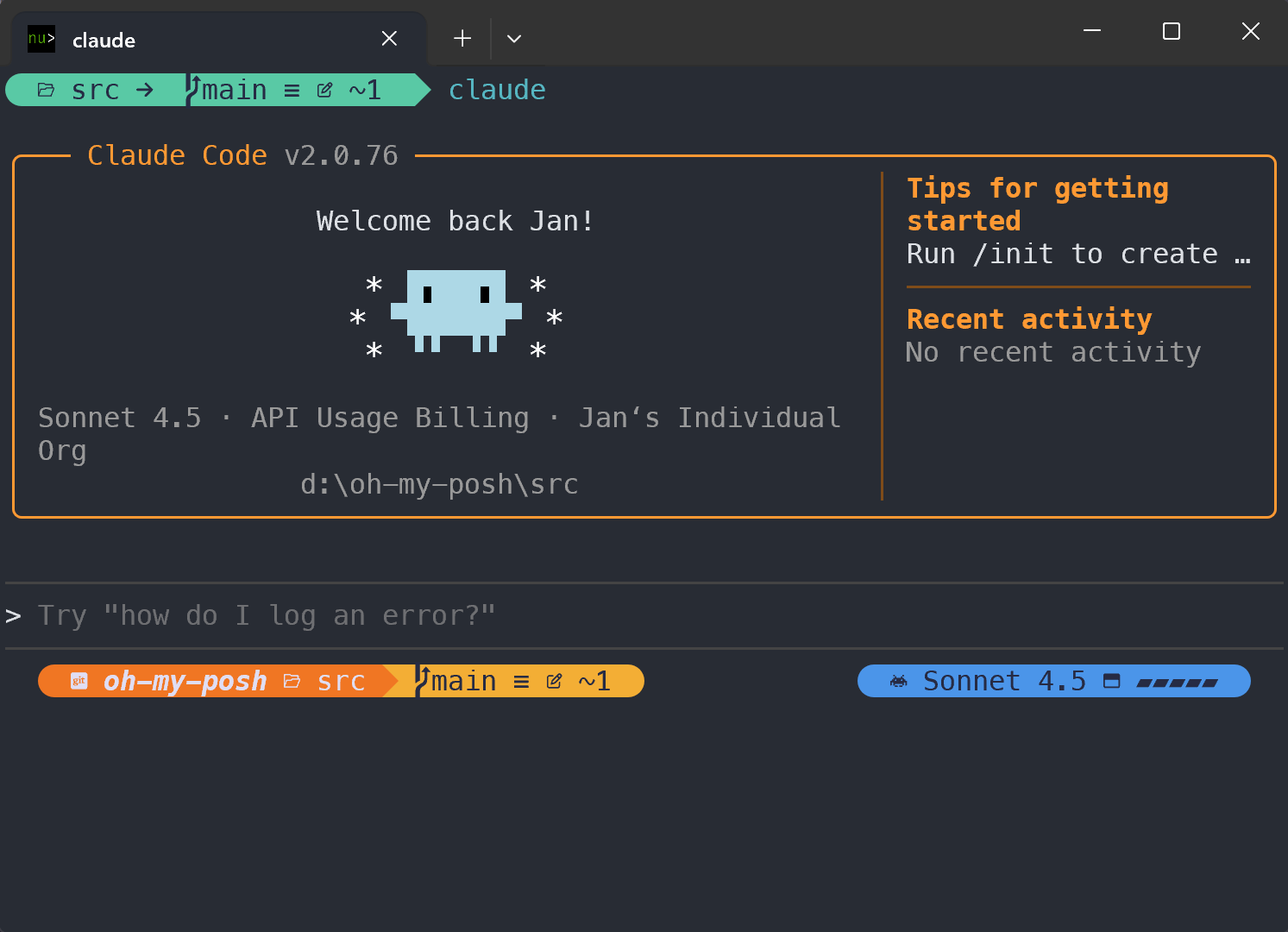
What is Claude Code's statusline?โ
Claude Code's statusline feature allows you to create custom status displays that appear at the bottom of
the Claude Code interface, similar to how terminal prompts work in shells. The statusline receives rich JSON
data about your current AI session via stdin, including:
- Model information: Which Claude model you're using (Claude Sonnet, Claude Opus, etc.)
- Token usage: Input/output tokens, context window utilization, and usage percentages
- Cost tracking: Real-time cost calculations and session duration
- Workspace context: Current and project directories
- Session metadata: Unique session IDs and version information
The statusline updates automatically when conversation messages change (throttled to every 300ms max), and
your command's stdout becomes the status display with full ANSI color support.
Setting Up the Integrationโ
Configuration is straightforward. Add this to your Claude Code settings:
{
"statusLine": {
"type": "command",
"command": "oh-my-posh claude",
"padding": 0
}
}
That's it! Oh My Posh will automatically detect when Claude Code provides session data and display the relevant information in your prompt.
It's important to note that the claude CLI command operates differently from your regular prompt
configuration. When used as a statusline command, Oh My Posh runs in a special mode that's completely separate
from your standard terminal prompt. This means you'll likely want to create a dedicated, minimal configuration
specifically for Claude Code that focuses on displaying AI session information rather than your usual prompt
elements.
Custom configurationโ
By default, the oh-my-posh claude command provides a built-in statusline that shows your current working
directory, git context, active model name, and context window usage as a visual gauge. To customize this
display, use the --config flag to specify your own theme configuration file that includes a custom claude
segment tailored to your preferences.
{
"statusLine": {
"type": "command",
"command": "oh-my-posh claude --config ~/.claude.omp.json",
"padding": 0
}
}
Just make sure the configuration also leverages the data available in the claude segment to visualize the stats you
care about. As this isn't like a regular prompt integration, keep the statusline a single line and use left and right
aligned prompt blocks to play with.
{
"$schema": "https://raw.githubusercontent.com/JanDeDobbeleer/oh-my-posh/main/themes/schema.json",
"palette": {
"black": "#262B44",
"blue": "#4B95E9",
"green": "#59C9A5",
"orange": "#F07623",
"red": "#D81E5B",
"sapling": "#a6d189",
"white": "#E0DEF4",
"yellow": "#F3AE35"
},
"accent_color": "32",
"blocks": [
{
"type": "prompt",
"alignment": "left",
"segments": [
{
"options": {
"dir_length": 3,
"folder_separator_icon": "\ue0bb",
"style": "fish"
},
"template": "{{ if .Segments.Git.Dir }} \uf1d2 <i><b>{{ .Segments.Git.RepoName }}{{ if .Segments.Git.IsWorkTree }} \ue21c{{ end }}</b></i>{{ $rel := .Segments.Git.RelativeDir }}{{ if $rel }} \ueaf7 {{ .Format $rel }}{{ end }}{{ else }} \uea83 {{ path .Path .Location }}{{ end }} ",
"foreground": "p:white",
"leading_diamond": "\ue0b6",
"background": "p:orange",
"type": "path",
"style": "diamond"
},
{
"options": {
"branch_icon": "\ue0a0",
"fetch_status": true
},
"template": " {{ if .UpstreamURL }}{{ url .UpstreamIcon .UpstreamURL }} {{ end }}{{ .HEAD }}{{if .BranchStatus }} {{ .BranchStatus }}{{ end }}{{ if .Working.Changed }} \uf044 {{ nospace .Working.String }}{{ end }}{{ if .Staging.Changed }} \uf046 {{ .Staging.String }}{{ end }} ",
"foreground": "p:black",
"leading_diamond": "<parentBackground,background>\ue0b0</>",
"trailing_diamond": "\ue0b4",
"background": "p:green",
"type": "git",
"style": "diamond",
"foreground_templates": [
"{{ if or (.Working.Changed) (.Staging.Changed) }}p:black{{ end }}",
"{{ if or (gt .Ahead 0) (gt .Behind 0) }}p:white{{ end }}"
],
"background_templates": [
"{{ if or (.Working.Changed) (.Staging.Changed) }}p:yellow{{ end }}",
"{{ if and (gt .Ahead 0) (gt .Behind 0) }}p:red{{ end }}",
"{{ if gt .Ahead 0 }}#49416D{{ end }}",
"{{ if gt .Behind 0 }}#7A306C{{ end }}"
]
}
]
},
{
"type": "prompt",
"alignment": "right",
"segments": [
{
"leading_diamond": "\ue0b6",
"template": " \udb82\udfc9 {{ .Model.DisplayName }} \uf2d0 {{ .TokenUsagePercent.Gauge }} ",
"foreground": "p:white",
"background": "accent",
"type": "claude",
"style": "diamond"
},
{
"options": {
"charged_icon": "\ue22f ",
"charging_icon": "\ue234 ",
"discharging_icon": "\ue231 "
},
"cache": {
"duration": "10m",
"strategy": "session"
},
"leading_diamond": "<background,parentBackground>\ue0b2</>",
"trailing_diamond": "\ue0b4",
"template": "{{ if not .Error }} {{ .Icon }}{{ .Percentage }}%{{ end }}",
"foreground": "#111111",
"background": "accent",
"type": "battery",
"style": "diamond",
"background_templates": [
"{{if eq \"Discharging\" .State.String}}p:orange{{end}}",
"{{if eq \"Full\" .State.String}}p:green{{end}}"
]
}
]
}
],
"version": 4
}
The Claude Code segmentโ
Oh My Posh's new claude segment taps into this statusline data to bring AI session awareness directly
into your terminal prompt. When you use the oh-my-posh claude command as your statusline command in Claude
Code, you get access to a wealth of session information that can be displayed in your prompt without needing
to know the technical details.
Example Configurationโ
Here's a sample configuration that shows the model name and context usage:
{
"type": "claude",
"style": "diamond",
"leading_diamond": "\ue0b6",
"trailing_diamond": "\ue0b4",
"foreground": "#FFFFFF",
"background": "#FF6B35",
"template": " \udb82\udfc9 {{ .Model.DisplayName }} \uf2d0 {{ .TokenUsagePercent.Gauge }} "
}
This displays something like: ๐ค Claude 4.5 Sonnet โฐโฐโฐโฑโฑ
The gauge provides instant visual feedback on how much of your context window you've consumed, which is crucial for managing long coding sessions.
The Technical Detailsโ
Under the hood, Oh My Posh reads the rich JSON session data that Claude Code provides via stdin when used
as a statusline command. The segment only activates when Claude Code session data is available, so there's no
performance impact when you're not using Claude Code.
Getting Startedโ
If you're already using Oh My Posh, adding Claude Code integration is as simple as:
- Install Claude Code if you haven't already
- Add the
statuslineconfiguration to your Claude Code settings - Optionally create your own configuration including the
claudesegment - Start a Claude Code session and watch your prompt come alive
For detailed configuration options and all available properties, check out the complete Claude segment documentation.
What's Next?โ
This integration opens up exciting possibilities. Imagine prompts that:
- Change color based on token usage percentage
- Show different icons for different AI models
- Display cost warnings when sessions get expensive
- Integrate with any other segment to show additional development context
The foundation is there, and now it's up to the community to build amazing configurations that make AI-powered development even more seamless.